How to install Budgie Backup
Updated 7th September 2026 by Simon Fearby · Budgie Backup (alpha)
This page is written so it can be handed to someone else. Follow it top to bottom and you will have Budgie Backup installed, and you will know how to check that the file you downloaded really came from me.
Before you start
- Windows 11, 64-bit (x64).
- An account with administrator rights. Budgie Backup needs elevation for Volume Shadow Copy, System Restore points, drive health queries, and reading locked files.
- Somewhere to back up to: space on an internal drive, and ideally a removable drive as well.
- About five minutes.
Which installer do I want?
| Installer | Choose this one if |
|---|---|
| Full installer the larger download |
You are not sure. It includes the .NET 10 Desktop Runtime, so there is nothing else to install. |
| Small installer the smaller download |
You already have the .NET 10 Desktop Runtime, or you are happy to let the setup fetch it. |
Both installers contain the same six applications. Current file names, sizes and hashes are always on the download page.
The steps
- Download the installer. Go to the Budgie Backup download page and pick the full or small installer from the table above.
-
Check what you downloaded (optional, recommended).
Open PowerShell in your Downloads folder and run
Get-FileHash -Algorithm SHA256 .\BudgieBackupSetup-Large-0-9-26-257.exe, substituting the file name you actually downloaded. The hash it prints must match the one on the download page, character for character. -
Run the installer.
Double-click the
.exe. Windows will ask for permission to make changes, because the installer writes to Program Files. See What you will see along the way below if a prompt surprises you. - Work through the setup. The installer is a standard Windows wizard. Accept the licence, confirm the install folder, and let it finish.
- Start with CreateBudgieBackupFile. That is the app that builds your backup plan. Pick what you want copied, save it as a .budgiebackup file, then double-click that file whenever you want to run the backup.
.zip archives that open
in Windows Explorer or 7-Zip without Budgie Backup being installed at all. If you do not want to zip files, just copy the items.Is it safe? The code signing
The application suite is written in Microsft Visual Studio 2026 (C#) and is very robust.
The installers are created in NSIS (Nullsoft Scriptable Install System) and is a professional open source system to create Windows installers. It is designed to be as small and flexible as possible and is therefore very suitable for internet distribution.

As of version 0.9.26.248, every application and both installers are digitally signed. Windows will show my name as the publisher rather than "Unknown publisher". If it ever says anything else, stop, because the file did not come from me.
Every file is code-signed
You can check this yourself before you run anything: right-click the
.exe, choose Properties, then the Digital Signatures tab.
The details there must match the table below.
The certificate is issued to me as an individual rather than to a company, which is the first row of the three kinds of code signing certificate:
- Individual Validation (IV) - Personal. This is the one Budgie Backup uses.
- Organisation Validation (OV) - Small Businesses
- Extended Validation (EV) - Large Businesses, the legal existence,
If you want to read more about the difference, SSLTrust have a plain-English write-up of the certificate types, and Microsoft document how the signatures work.
The updater checks the signature and the hash of anything it downloads before it runs it, so an update that has been tampered with in transit is rejected rather than installed.
What you will see along the way
Signing removes the "Unknown publisher" warning, but it does not make every warning disappear. Microsoft SmartScreen also weighs how often a file has been downloaded, and a new alpha release from a small publisher has very little of that history yet. So you may still be asked to confirm.
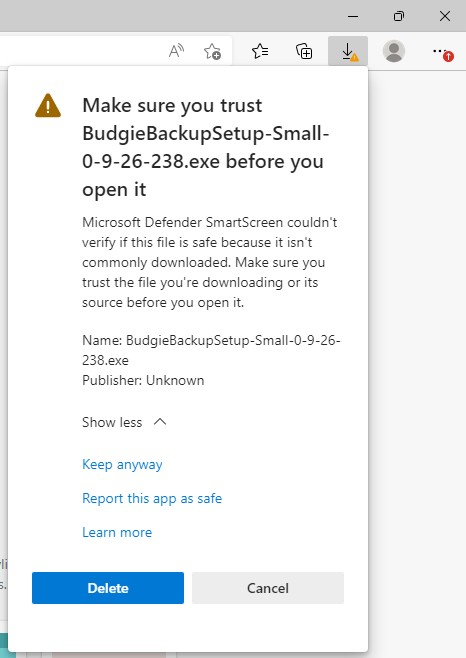
Edge will warn that the file is not commonly downloaded (that is true)
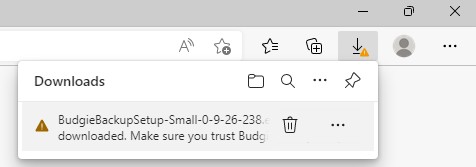
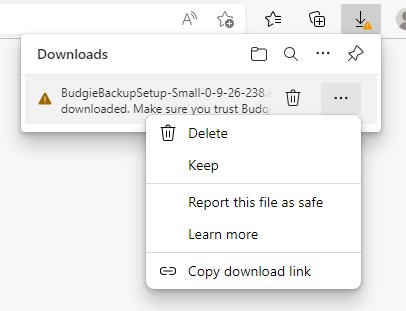
Choose Keep (and Report as Safe)
Edge is serious, Choose Show more then Keep Anyway
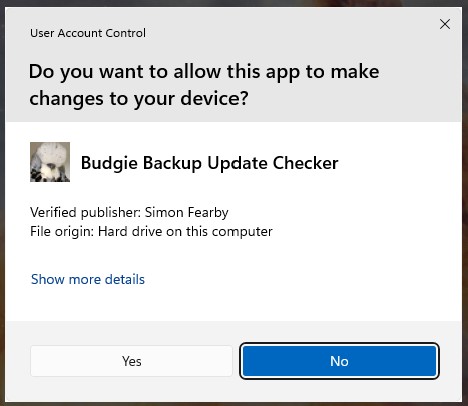
User Access Control (Before Apps were digitally signed)
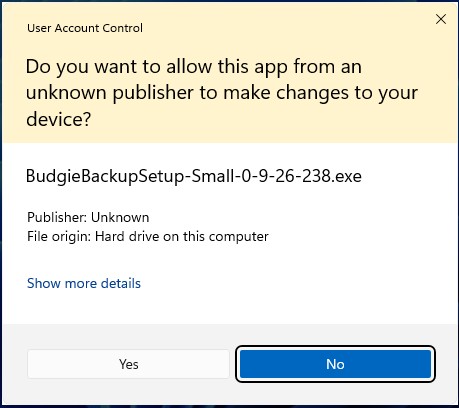
User Access Control (After Apps were digitally signed)
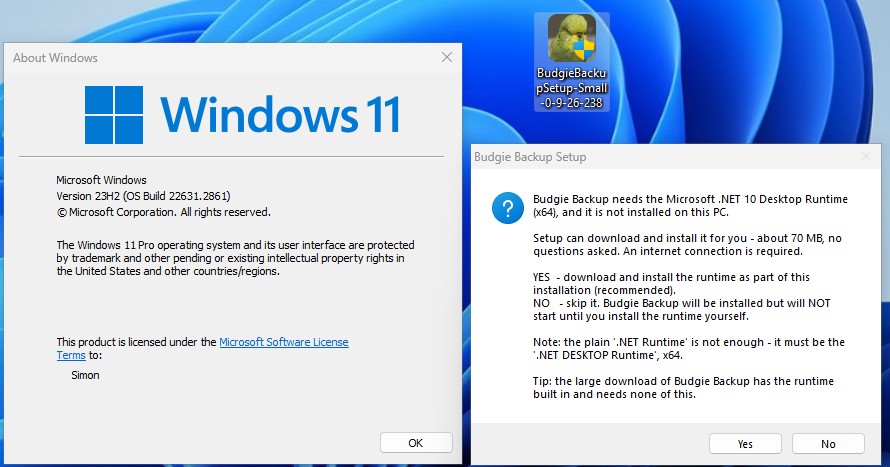
If the .NET runtime is missing
If you Windows is older or if you do not have the Microsoft .NET runtime files, the setup will auto doenload them for you.
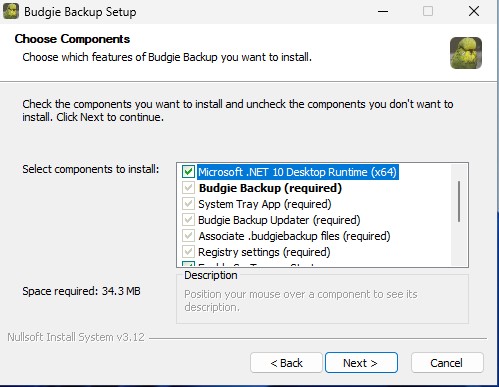
Only the small installer will contain the runtime installer
Common questions
Do I have to pay for it?
No. Budgie Backup is free while it is in alpha. The only thing that can cost money is the optional cloud sync, and that bill comes from Backblaze for the storage you use, not from me.
Why does it need administrator rights?
Volume Shadow Copy, System Restore points, drive health queries, and reading files that another program currently has open. Without elevation, files that are locked, such as your Outlook data or an open browser profile, cannot be copied cleanly.
The build has expired. What now?
Every alpha build has a built-in expiry date so that nobody is quietly relying on an old one. Download the current release from the download page, or let BudgieBackupUpdater fetch it for you.
How do I remove it?
The usual way, through Windows Settings, Apps, Installed apps. There are screenshots on the miscellaneous page.
Something went wrong. How do I report it?
Every app in the suite has a built-in bug report tool, and an uncaught error starts one for you. Reports are used to fix the bug and then deleted. You can also email budgiebackup@fearby.com.
Related pages
Help Test Early Builds
This is a work in progress, features will change.
If you wan't to help test Alpha builds reach out here: alpha-test-request-budgiebackup@fearby.com or reach out and suggest a feature here: budgiebackup@fearby.com.
Buy Me a Coffee and support the development.
Return Home